Oracle Web Application Programming for PL/SQL Developers
Solutions CLASSES_LOCATION.PSP
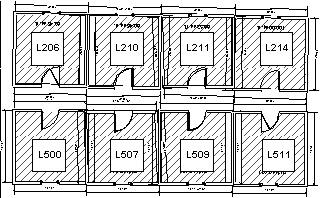
Description: This PSP displays an image with a corresponding image map. The purpose of this page is to assign or update the meeting location for a specific section of a course. The top of the page should display all the section details - course number, course description, instructor first and last name, section number, start_date_time and location. Clicking one of the class rooms will result in a call to the class_location_update procedure. Each classroom should be created as a square region with a hyperlink to the class_location_update procedure, passing the room number as a parameter. When a user clicks on one of the classrooms in the image, the class_location_update procedure should update the location for the class and then call the procedure, class_location again, so the new value for location can be seen and validated by the user.
Use the following image locations.jpg as the image for the clickable image map.
<%@ page language="PL/SQL" %>
<%@ plsql procedure="classes_location" %>
<%
--------------------------------------------------------
-- FILENAME: class_location
-- FILEDATE: Jan 10, 2003
-- CREATED BY: Ben Rosenzweig
-- URL : http://localhost/pls/any/classes_location
--------------------------------------------------------
%>
<%@ plsql parameter="p_section_id"   type="SECTION.section_id%TYPE"     default="NULL" %>
<%! v_course_no          COURSE.course_no%TYPE;
    v_description        COURSE.description%TYPE;
    v_ifirst_name        INSTRUCTOR.first_name%TYPE;
    v_ilast_name         INSTRUCTOR.last_name%TYPE;
    v_section_no         SECTION.section_no%TYPE;
    v_start_date_time    VARCHAR2(50);
    v_location           SECTION.location%TYPE;
%>
<%  SELECT s.course_no,
           c.description,
           i.first_name,
           i.last_name,
           s.section_no,
           TO_CHAR(s.start_date_time,'Mon-DD-YYYY HH:MIAM'),
           s.location
    INTO v_course_no,
         v_description,
         v_ifirst_name,
         v_ilast_name,
         v_section_no,
         v_start_date_time,
         v_location
    FROM section s,
         course c,
         instructor i
    WHERE s.section_id   = p_section_id
    AND   s.course_no    = c.course_no
    AND   s.instructor_id= i.instructor_id;
%>
<HTML>
<HEAD>
<TITLE>Class Location Information</TITLE>
</HEAD>
<BODY >
<P ALIGN="CENTER">
<STRONG>
<EM>
<FONT SIZE="+2" COLOR="BLUE">Class Location Information for Section
<%= v_section_no %><BR>
</FONT>
</EM>
</STRONG>
</P>
<P>
<TABLE BORDER="2" ALIGN="CENTER" CELLSPACING="0" CELLPADDING="0" BGCOLOR="WHITE">
  <TR>
    <TD ALIGN="CENTER"><B><I>Course<BR>No</I></B></TD>
    <TD WIDTH="30%" ALIGN="CENTER"><B><I>Course</I></B></TD>
    <TD WIDTH="20%" ALIGN="CENTER"><B><I>Instructor<BR>Name</I></B></TD>
    <TD ALIGN="CENTER"><B><I>Section<BR>No</I></B></TD>
    <TD WIDTH="30%" ALIGN="CENTER"><B><I>Start Date<BR>and<BR>Time</I></B></TD>
    <TD ALIGN="CENTER"><FONT COLOR="MAROON"><B><I>Location</I></B></FONT></TD>
  </TR>
  <TR>
    <TD ALIGN="CENTER"><%= v_course_no %></TD>
    <TD ALIGN="CENTER"><%= v_description %></TD>
    <TD ALIGN="CENTER"><%= v_ifirst_name || ' ' || v_ilast_name %></TD>
    <TD ALIGN="CENTER"><%= v_section_no %></TD>
    <TD ALIGN="CENTER"><%= v_start_date_time %></TD>
    <TD ALIGN="CENTER"><%= v_location %></TD>
  </TR>
</TABLE>
<% htp.mapOpen('location_map');
     htp.area('14 ,12 ,84 ,86 ','RECT','classes_location_update?p_section_id='
              ||p_section_id||'&p_location=L206');
     htp.area('89 ,15 ,158,86 ','RECT','classes_location_update?p_section_id='
              ||p_section_id||'&p_location=L210');
     htp.area('163,17 ,230,85 ','RECT','classes_location_update?p_section_id='
              ||p_section_id||'&p_location=L211');
     htp.area('236,19 ,303,88 ','RECT','classes_location_update?p_section_id='
              ||p_section_id||'&p_location=L214');
     htp.area('16 ,112,84 ,180','RECT','classes_location_update?p_section_id='
              ||p_section_id||'&p_location=L500');
     htp.area('88 ,114,156,182','RECT','classes_location_update?p_section_id='
               ||p_section_id||'&p_location=L507');
    htp.area('161,113,229,180','RECT','classes_location_update?p_section_id='
                 ||p_section_id||'&p_location=L509');
    htp.area('236,115,303,183','RECT','classes_location_update?p_section_id='
                 ||p_section_id||'&p_location=L511');
   htp.mapClose;
%>
<BR>
<BR>
<CENTER>
<% htp.img2('/images/location.gif',cismap=>'1',cusemap=>'#location_map'); %>
</CENTER>
</BODY>
</HTML>
To aid your work with Oracle Web Application Programming for PL/SQL Developers, we will provide in the coming weeks on this site the code and specifications for the sample application that is built throughout the book. The sample application is a way for you to try out the concepts covered in the book.
In advance of this, we are providing background information on each unit of code in the sample application:
Select a Sample Application Code Unit
- main_frame (15.2)
- top_menu (13.3) / (15.2)
- splash (13.1)
- student_main_frame (6.3)
- students_left_nav (6.3)
- search_student (12.4)
- get_student (12.4)
- student_list (12.4)
- student_personal_info (12.4)
- student_zipcode (18.5)
- update_student (18.5)
- instruct (Package Spec and Body)
- grade_calc (9.2)
- v_font (9.4)
- c_instruct_list (9.4)
- inst_tbl_type (9.4)
- instruct_table (9.4)
- [PL/SQL block to load instruct_table] (9.4)
- instruct_personal_info (11.3)
- instructor_list_info (11.3)
- showzip (11.3)
- instructors_frame (11.1)
- instructors_left_nav (11.1)
- update_instructor (11.2)
- instructor_list_class (11.3)
- instruct_classes (11.3)
- student_list (11.2)
- classes_main_frame (6.3)
- classes_left_nav (6, Building App)
- classes_list (6, Building App)
- classes_location (13.4)
- classes_location_update (13.4)
- set_cookie (15.2)
- get_cookie (15.2)
- cookie_exists (15.2)
- visitor_name (15.2)
- process_visitor_name (15.2)
- student_list_update (not in book)